Friday, April 22, 2022

Need to Translate RSS Feeds? It’s Easy with IFTTT and This Google Apps Script

Need to Translate RSS Feeds? It’s Easy with IFTTT and This Google Apps Script
By ResearchBuzz

Earlier this week I wrote an article about finding and previewing foreign-language RSS feeds using a Google Sheet I made, the RSSinator. That’s useful but it doesn’t answer an obvious question: how do you translate foreign-language RSS feeds on an ongoing basis?

When I researched methods to do this, I quickly hit a money wall. Zapier, a workflow creator like IFTTT, has a way to do it, but Zapier is expensive for a solo researcher. After a little poking around I gave up and decided to make my own. My first method, using a Google Sheet template, was a miserable failure, so I decided to teach myself Google Apps Script and make a better solution.

And that method worked.

This translation tool is not difficult at all but there are several steps. First I’ll share the script and show you how it works, then I’ll show you how to create a custom IFTTT recipe to aggregate RSS feeds, then I’ll show you how to add the script to your own feed’s worksheet. You’ll need an IFTTT account and access to Google Docs.

Introducing the Translation Google Apps Script

I’ve created a Google Sheet full of items from Spanish-language RSS feeds. You can grab a copy here:

https://docs.google.com/spreadsheets/d/1SGUSh4mJj1UdbOuwdU64648sjIinKLJMs1myNMb9jto/copy 

If you’ve copied Google Sheets before, you know you get a screen asking you if you want to copy a shared document. But this time you’ll also get a script warning:

Screenshot from 2022-04-22 07-03-58

That’s okay, you should expect that since I’ve included the script in the spreadsheet. Click on Make a copy.

After you’ve made the copy, the Google Sheet will open up and look like this:

Screenshot from 2022-04-22 08-06-15

A few seconds after that, you’ll see a menu item magically appear:

Screenshot from 2022-04-22 07-22-07

If you click on Translation you’ll see one option: Translate This Feed.

Screenshot from 2022-04-22 07-22-17

All you have to do is click on that and soon you’ll get a spreadsheet full of translated feeds, right? Well, mostly. First you have to go through the script permission drama.

Script Permission Drama

When you first try to run anything with Google Apps Script in it, Google will give you dire warnings about things going very very wrong. And that’s appropriate – scripts can be really powerful and really mess up your data.

My script is not super powerful. It makes two external calls per feed item to apply Google Translations and it formats the results onto a new worksheet in the Google Sheet. But Google’s not going to assess my script, it’s just going to give you dire warnings.

When you first choose Translate This Feed from the Translation menu, Google warns you that there’s a script incoming:

Screenshot from 2022-04-22 07-22-34

Click Continue and it’ll prompt you for the GMail account you want to use:
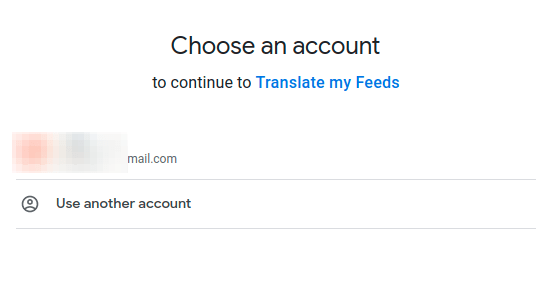
Screenshot from 2022-04-22 07-22-54

And then it will warn you.

Screenshot from 2022-04-22 07-49-42

The developer email will look familiar. It will be your email! Because this is a personal script, Google hasn’t verified this and it’s warning you. Click on Advanced. You’ll get one more warning:

Screenshot from 2022-04-22 07-50-17

In this case YOU are the developer, because it’s a personal script. And I will show you what the script does momentarily. After you’ve read all the warnings, take a deep breath and click on Go to Translate My Feeds (unsafe) to get the last boss-level warning:

Screenshot from 2022-04-22 08-00-35

Theoretically I suppose my script could access all your stuff and wreak havoc, but I promise you, it doesn’t. Just here to translate. Click on Allow and you’ll be taken back to the spreadsheet. Use the Translation menu and choose Translate This Feed. If you’ve given all the appropriate permissions you’ll get a notice that the script is running:

Screenshot from 2022-04-22 08-05-09

It will take a minute or two because it’s translating a couple dozen RSS feeds. When it’s done it’ll refresh to a new worksheet that looks like this. Congratulations, you have successfully bulk-translated a sheet of RSS feeds with one click!

Screenshot from 2022-04-22 08-09-59

The link is the first column, the date of the item is the second, the third is the translated item title, and the fourth is the translated summary. The new worksheet created by the script is called Translated and it can’t be duplicated; if you run the translation script twice in a row it’ll fail the second time because there will already be a worksheet called Translated. Simply rename or remove the worksheet before you run the script again.

So the script works well, as you can see, but what’s happening under the hood? You can take a look by going to the Extensions Menu and choosing Apps Script:

Screenshot from 2022-04-22 08-17-20

Which will take you to the script editor.

Screenshot from 2022-04-22 08-21-23

I put comments on my script so you could get an idea of what each section is doing, but you do not need to change any of it, except for (potentially) one line. That line is line 49:

Screenshot from 2022-04-22 08-23-27

My script auto detects the RSS feed’s language to be translated, so you don’t need to specify that (and you can put multiple languages on one Google Sheet without any problems) but you have to specify what language you want the RSS feed items to be translated into. That’s what the variable lang on line 49 does.

My script’s default is English, but you can put any two-letter language code in between the quotation marks and it should work. I couldn’t test every last language but French (fr) and Japanese (ja) worked fine. If you don’t know the two-letter code you need, Google two-letter language code and the name of the language you want to translate to. If you do change the language code, don’t forget to click the script editor’s save button (Screenshot from 2022-04-22 08-37-04) to save the change before you run the script again!

Now what do we have? We have a spreadsheet full of Spanish-language feeds and we’ve got a script that can translate them all in one click! But where did the feeds come from?

IFTTTT.

Using IFTTT To Gather RSS Feeds

If you’ve been reading ResearchBuzz for any length of time you know about IFTTT. If you don’t, check out this explainer from Pocket-lint. It should give you enough information about IFTTT for this next section to make sense.

In order to create a spreadsheet full of RSS feeds to translate, you need a way to aggregate them. That’s what IFTTT is for. You’ll be using a recipe to put the contents of an RSS feed you specify into a Google Sheet. Then you’ll be adding the script I made to that Google Sheet.

And hey! You don’t even need to make a recipe, because your ol’ pal ResearchBuzz has an IFTTT Pro account. Check out my published recipes at https://ifttt.com/p/researchbuzz .You want the one called “Send RSS feed items to an auto-translating Google Sheet.” The direct URL is https://ifttt.com/applets/rsFeh7Rv-send-rss-feed-items-to-an-auto-translating-google-sheet .

You may need to connect your Google Drive to IFTTT if you’ve never done it before, but once that’s done you should get a template for this recipe:

Screenshot from 2022-04-22 09-53-25

The first thing you’ll need to add is an URL for an RSS feed. If you don’t have any handy you can use the RSSinator to generate some. Put the URL for the RSS in the Feed URL box.

After that you’ll need to confirm you’re using the right Google Drive account (the account name will appear automatically after you connect Google Drive to IFTTT) as well as give a name for your new spreadsheet and set a drive path so you’ll know where to look for these newly-created files. In my case, I’m calling the new spreadsheet My New Feeds and I’m putting it in the RSS/ directory. Click Save when you’ve finished populating the template.

Note that IFTTT will only fill a spreadsheet up to 2000 rows. After that it’ll start a new sheet. (You can delete old rows you’re not using to maintain the same spreadsheet; as long as your sheet has under 2000 rows populated the IFTTT recipe will keep updating it.)

Screenshot from 2022-04-22 10-43-03

After that you’ll get taken back to the main applet page with confirmation that your IFTTT recipe has been created!

Screenshot from 2022-04-22 10-03-19

If you don’t have an IFTTT Pro Account (you don’t need one to use this recipe) then IFTTT will check for new RSS feed items every hour or so. You can use the View activity and Check now buttons to see what your IFTTT recipe has done.

Screenshot from 2022-04-22 10-14-33

Last night I made an IFTTT recipe to aggregate Spanish-language RSS feeds and let it run all night so I’d have an example set to use this morning. Here’s a sample of what that feed’s activity looks like. It shows you the item found and the action taken, in this case adding lines to a spreadsheet.

Screenshot from 2022-04-22 10-17-43

Because I know this IFTTT recipe has successfully run, then I should expect to find a Google Sheet called My New Feeds in the RSS/ directory of my Google Drive. And there it is!

Screenshot from 2022-04-22 10-44-29

Let’s open it up and see what it looks like:

Screenshot from 2022-04-22 10-45-17

A confession: I created several RSS feeds and directed all of them to this Google Sheet with IFTTT recipes last night to make sure I’d have a large enough sheet to show you how my translation script works. It worked too well and aggregated about 1500 RSS feed items by this morning!

So I abridged this sheet for three reasons: 1) You don’t need 1500 items to see how this works, 2) The script would take ages to run and you might fall asleep, and 3) Google Apps Script has a limit of 5000 calls to Google Translate per day, so a 1500-row spreadsheet would use up a lot of your translation capacity in one click. Instead we’ll use this shorter one. No matter what size the spreadsheet is, all you’ve got to do is add the script you were using before.

If you don’t want to wait for your own IFTTT recipe to populate, you can follow along with this spreadsheet to see how adding a script works.

https://docs.google.com/spreadsheets/d/1WDK2mnIMQtKpK3TnPjkuXyGSRK6QBSCHV20JUb94pGQ/copy 

Adding the Google Apps Script

At the beginning of this article I shared a spreadsheet with you called Spanish RSS Feeds. Go back to that sheet and choose Extensions, then Apps Script:

Screenshot from 2022-04-22 08-17-20

That will take you back to the Apps Script editor:

Screenshot from 2022-04-22 10-50-52

Make sure that your cursor is in the editing box (that should happen automatically) and click Ctrl+A to copy everything. It should turn blue:

Screenshot from 2022-04-22 10-51-26

Now Ctrl+C to copy it.

Where do you copy it? Into your My New Feeds sheet. Go to that sheet and choose Extensions, then Apps Script. The scripts editor on this sheet should be empty:

Screenshot from 2022-04-22 10-53-57

Make sure your cursor is in the script editor and Ctrl+V to paste the script:

Screenshot from 2022-04-22 10-54-13

You don’t have to change the name from Untitled Project.

Finally, click the save icon (Screenshot from 2022-04-22 10-54-25) and you’ve done it! You’ve added a translation script to your IFTTT RSS feed aggregator, but the Translation menu will not appear until the spreadsheet reloads. Make sure you’ve saved your script, then close the script editor tab and the main spreadsheet tab in your browser.

Now reopen the spreadsheet into which you have pasted your script. After a few seconds a Translation menu item will appear (it won’t be instant.)

Screenshot from 2022-04-22 11-10-59

Click on the Translate This Feed item under the Translation menu and (after another round of script approval drama) you now have your very own RSS feed aggregator spreadsheet with a script that will translate the feed items with one click!

It’s several steps to set up, but as long as your RSS feeds aggregate on this one sheet (either because you remove old feed rows as you don’t need them or your feeds add items very slowly) you should not have to repeat the script permission process every time you translate. If you would like to create multiple spreadsheets, just copy the script into each one’s Apps Script editor as we just did for the My New Feeds sheet.

Figuring out a way to auto-translate RSS feeds without handing Zapier my wallet took a while, but I’m happy with the way it turned out. I’ll probably spend the weekend beefing up the AutoRSSinator with more languages, then I’ll do a roundup article Monday.

Thanks for reading! And if you support me on Patreon, reach around and give yourself a big pat on the back. It’s because of your support that I have the time and space to figure these things out and share them with you!


April 22, 2022 at 09:14PM
via ResearchBuzz https://ift.tt/ArpJXN7

Thursday, April 21, 2022

Translate a Story Ukraine, Mapping Ukraine Damage, Yandex, More: Ukraine Update, April 21, 2022

Translate a Story Ukraine, Mapping Ukraine Damage, Yandex, More: Ukraine Update, April 21, 2022
By ResearchBuzz

NEW RESOURCES

UNESCO: UNESCO and NORAD join forces with partners to translate storybooks for Ukrainian children. “The Translate a Story Ukraine campaign has set out to translate at least 100 early-age digital books into Ukrainian. The translated books will be proofread and made available on the Global Digital Library (GDL) and local Ukrainian online platforms. They will be freely accessible through mobile phones, tablets and other mobile learning devices.”

The Mainichi: Japan researchers create online maps with satellite images to expose damage in Ukraine. “A research team led by a University of Tokyo professor has created digital maps utilizing satellite images and other photos to show the reality of damaged areas in Ukraine amid the Russian invasion. Hidenori Watanave, information design professor at the University of Tokyo’s graduate school, said that by updating latest information online, internet users can observe the movements of troops coming in from Russia, as well as the state of the expanding destruction in eastern Ukraine following large-scale battles.”

TWEAKS AND UPDATES

The Moscow Times, translated from Russian (I could not find a version of the article in English): Authorities banned Yandex from selling Novosti and Zen. “The sale of Zen and Novosti was postponed on orders from ‘above,’ two Yandex managers told The Moscow Times . One of them complained that against the backdrop of the war in Ukraine, the media assets of Yandex, the second most popular search engine in Russia after Google, have become toxic and negatively affect the company’s reputation.”

Washington Post: For Russian tech firms, Putin’s crackdown ended their global ambitions. “Yandex’s slow collapse, detailed here for the first time, shows how even the most advanced companies couldn’t be safe with their core operations in Russia, underscoring why entrepreneurs and investors predict that it will be years, if not decades, before they’ll be willing to reengage there again.”

The Verge: Google denies Ukrainian reports it unblurred satellite Maps imagery in Russia. “The Verge was able to confirm that at least one of the images from the tweet is available on Google Maps, and it does depict an active Russian military site. We were also able to find other examples of Google Maps showing other bases in the country. However, the company says this isn’t new.”

USEFUL STUFF

SwissInfo: Swiss technology foils Russian censorship. “The Swiss software Kiwix enables the user to copy entire websites so they can be accessible offline. Now that Wikipedia risks sanction in Russia because of its content on the Ukraine war, downloads of the free online encyclopaedia using Kiwix are off the charts.”

AROUND THE SEARCH AND SOCIAL MEDIA WORLD

Motherboard: Russia’s Latest Propaganda Video: the TikTok Sea Shanty. With Fake Nurses.. “Russian-backed separatists have recorded a propaganda version of ‘The Wellerman Song’ the ‘sea shanty’ that went viral on TikTok last year. The video shows women dressed as First World War nurses doing a coordinated dance routine in front of a projection of the flag of the Luhansk People’s Republic.”

Business Insider: Russia’s propaganda machine is so powerful that many Russians don’t even realize they’re in a disinformation bubble. “Western leaders are urging Russian citizens to access independent and verified news about the ongoing war in Ukraine as Russia ramps up its invasion and corresponding disinformation campaign. On April 6, UK Prime Minister Boris Johnson called on Russians to obtain VPNs in order to access international media outlets. But experts and Russians alike say Johnson’s appeal — and his proposed solution — may not make much of a dent in the course of the war.”

The Guardian: Empty galleries and fleeing artists: Russia’s cultural uncoupling from the west . “On a recent Saturday in April, Muscovites strolled around GES-2, a vast new arts centre built in a disused power station steps away from the Kremlin. But guests visiting the 54,400-sq-metre centre, designed by the pioneering Italian architect Renzo Piano, were faced with one hard-to-miss problem: the art was absent. ‘It is not the time for contemporary art when people are dying and blood is spilling. We can’t pretend as if life is normal,’ said Evgeny Antufiev, a Russian artist who asked for his works to be removed from GES-2 shortly after Russia invaded Ukraine on 24 February.”

Washington Post: Sinking of Russian warship raises tense questions about fate of crew. “Russia confirmed that the ship sank but said only that it had been damaged by ‘heavy storms’ and a fire that caused ammunition on board to detonate. On April 14, the Russian defense ministry said all crew members were evacuated. The authorities have not confirmed any dead or wounded. But several families are now contradicting this claim in Russian media reports and on social media. Social media groups uniting mothers of Russian soldiers deployed in Ukraine are filling up with photos and pleas from parents looking for their missing sons.”

SECURITY & LEGAL

Reuters: U.S. lawmakers urge Facebook to do more to fight Russia propaganda in Spanish. “A group of 21 U.S. lawmakers sent a letter to Facebook chief executive Mark Zuckerberg on Wednesday voicing concern about what they called disinformation on the platform aimed at Spanish speakers about Russia’s invasion of Ukraine.”

AFP: Tech battles to show worth in Ukraine war crimes probes. “Russia’s war in Ukraine is still being counted in days, but images of atrocities already number in the hundreds of thousands. The conflict is the first to throw up such rich evidence in real time, but the sheer volume of material poses a huge challenge for those trying to use it as evidence of war crimes.”

The Times: Stolen AirPods give away Russian retreat positions. “A Ukrainian man has been able to track the redeployment of Russian troops to the east of the country via a pair of wireless earbuds looted from his home near Kyiv. Vitaliy Semenets used the ‘Find my’ feature available on Apple products to follow the progress of the stolen Airpod via Bluetooth technology.”

Do you like ResearchBuzz? Does it help you out? Please consider supporting it on Patreon. Not interested in commitment? Perhaps you’d buy me an iced tea. I love your comments, I love your site suggestions, and I love you. Feel free to comment on the blog, or @ResearchBuzz on Twitter. Thanks!


April 21, 2022 at 06:53PM
via ResearchBuzz https://ift.tt/Bj0Vnfg

Nursing Home Ownership, Human Histology, T-Mobile Lawsuits, More: Thursday ResearchBuzz, April 21, 2022

Nursing Home Ownership, Human Histology, T-Mobile Lawsuits, More: Thursday ResearchBuzz, April 21, 2022
By ResearchBuzz

NEW RESOURCES

CMS: HHS Releases New Data and Report on Hospital and Nursing Home Ownership. “The Centers for Medicare & Medicaid Services (CMS) is releasing data publicly — for the first time — on mergers, acquisitions, consolidations, and changes of ownership from 2016-2022 for hospitals and nursing homes enrolled in Medicare…. HHS’s Office of the Assistant Secretary for Planning and Evaluation (ASPE) is also releasing a related report — an analysis of the new CMS data examining trends in changes of ownership over the past six years.”

Harvard Medical School: Data Deep Dive . “Minerva, available online to anyone, is named after the Roman goddess of wisdom. It allows users to access in-depth maps of tissue samples gathered during research, ranging from cancerous tumors to heart muscle in distress. On each map, users can zoom and pan, overlay features such as immune cells, and explore noteworthy areas. The maps also incorporate the expertise of scientists and medical doctors who can create narratives to guide users through the samples.”

TmoNews: New website keeps track of all lawsuits T-Mobile is facing. “Today, a new website has emerged to keep an eye out on all the complaints and lawsuits that T-Mobile is facing against former Sprint dealers and distributors. As of this writing, Wireless Franchisees for Justice has recorded a total of 15 complaints from Plaintiffs from over 20 states. The website also details that the merger has caused 382 stores to close down with a corresponding job loss of over 2,500. ”

TWEAKS AND UPDATES

Natural History Museum of Utah: Museum launches Triceratops Traits for middle schoolers. “Today, the Natural History Museum of Utah (NHMU) is launching a new educational investigation as part of Research Quest, its award-winning and free online education program. In Triceratops Traits, the new investigation, students work alongside paleontologists to solve an evolutionary mystery by analyzing and interpreting data from the fossil record. This data, documenting the diversity, evolution and extinction of life forms, are interpreted under the premise that natural laws have operated the same throughout the history of life on Earth to fit 7th grade learning standards in Utah and 6th-8th grades around the U.S.”

TechCrunch: Google Search now displays city-level air quality information in the US. “Google is rolling out detailed information about air quality in Search, the company confirmed to TechCrunch on Wednesday. The company notes that the launch currently only supports city-level queries. Google first rolled out the feature in India last November. The company says it’s now bringing the feature to Search in the United States to help people find timely and actionable information about air quality in their area.”

PTI: Social media app Koo makes algorithms public; pledges commitment to transparency, neutrality. “Twitter-rival Koo on Wednesday said it has become the first significant social media platform to publish the philosophy and workings behind its core algorithms, thereby empowering users to understand why they are seeing the content that they do. These algorithms were made public on Koo’s website, according to a statement.”

USEFUL STUFF

WIRED: BeReal Basics: How to Use the ‘Unfiltered’ Social Media App. “A FRENCH SOCIAL media platform launched by Alexis Barreyat in 2020, BeReal is attracting dedicated users on US college campuses after gaining popularity overseas. Essentially, BeReal sends users a prompt at a random time each day, urging them to snap a picture and send it to their friends. You only have two minutes to respond, and a two-image collage is captured from your front and back cameras.”

AROUND THE INTERNET WORLD

South China Morning Post: Supporters of Hong Kong chief executive candidate John Lee accuse Google of interfering in poll after YouTube pulls his channel. “Online video platform YouTube cancelled Hong Kong’s sole chief executive candidate John Lee Ka-chiu’s campaign channel on Wednesday as it emerged that Facebook had restricted his user status, both citing compliance with United States sanction laws but earning a rebuke from the leadership contender who accused the US of bullying.”

Tubefilter: The video app Josh is making deep inroads in India. Its parent company just raised $805 million.. “The Indian government’s decision to ban TikTok has turned the country’s short-form video landscape into a gold rush. American tech companies like Instagram and YouTube have made inroads in the world’s second-most populous nation, but the biggest winners of the post-TikTok era have been local platforms.”

SECURITY & LEGAL

Vox: Companies lose your data and then nothing happens. “There’s a simple reason companies collect so much of our data — money — but why they get to collect so much, keep it, and monetize it is more complicated. There are some laws around data privacy and security, but they’re scattershot and generally handled state by state, and they could be better. Companies keep screwing up with our data, and there are no good answers on what to do about it.”

CNET: Google Experts Found a Record Number of Zero-Day Security Bugs Last Year. “Project Zero, an in-house team of Google experts and analysts tasked with finding advanced cybersecurity threats known as zero-day vulnerabilities and exploits, detected a record-breaking 58 in-the-wild exploits in 2021, according to a report from the team published Tuesday.”

RESEARCH & OPINION

Analytics India: Google unveils Phorhum; state-of-the-art in photorealistic 3D human reconstruction. “Google unveiled Phorhum, a photorealistic 3D human reconstruction that can greatly help online apparel shopping. Phorhum is a method to photo-realistically reconstruct a dressed person’s 3D geometry and appearance as photographed in a single RGB image. The produced 3D scan of the subject accurately resembles the visible body parts and includes plausible geometry and appearance of the non-visible parts.” Good morning, Internet…

Do you like ResearchBuzz? Does it help you out? Please consider supporting it on Patreon. Not interested in commitment? Perhaps you’d buy me an iced tea. I love your comments, I love your site suggestions, and I love you. Feel free to comment on the blog, or @ResearchBuzz on Twitter. Thanks!


April 21, 2022 at 05:51PM
via ResearchBuzz https://ift.tt/2DfoxbN

Wednesday, April 20, 2022

Utah Theater, Washington Post, Google, More: Wednesday Afternoon ResearchBuzz, April 20, 2022

Utah Theater, Washington Post, Google, More: Wednesday Afternoon ResearchBuzz, April 20, 2022
By ResearchBuzz

NEW RESOURCES

Salt Lake Tribune: Final scene: Salt Lake City’s Utah Theater meets the wrecking ball. “Wrecking cranes began gouging into the blond brick walls of the Utah Theater on Tuesday as a hotly contested demolition of the historic building finally got underway…. Interior features of the neoclassical playhouse, opened in 1919, have also been extensively documented in a digital archive now maintained at the University of Utah’s Marriott Library.”

Washington Post: Introducing “Ecokitchen,” a Washington Post newsletter dedicated to climate-conscious cooking. “…to commemorate Earth Day 2022, The Washington Post will lift its paywall and offer free digital access to The Post – including its award-winning climate coverage – to all registered non-subscribers from April 20-22.”

TWEAKS AND UPDATES

9to5 Google: Google Search on desktop tests redesign that puts Images, Video, and more to the left. “Google has been spotted testing a new redesign for Search that moves alternate search methods like Google Images over to the left-hand side.”

The Verge: Brave is bypassing Google AMP pages because they’re ‘harmful to users’. “Brave announced a new feature for its browser on Tuesday: De-AMP, which automatically jumps past any page rendered with Google’s Accelerated Mobile Pages framework and instead takes users straight to the original website…. Brave framed De-AMP as a privacy feature and didn’t mince words about its stance toward Google’s version of the web.”

USEFUL STUFF

MakeUseOf: 5 Free Teleprompter Apps to Read Scripts While Shooting Videos or Hosting Webinars. “From the President of the USA to Jeff Bezos, successful people use teleprompters to give speeches that seem impromptu. You can use the same trick to remember your lines with these free teleprompter apps.”

AROUND THE INTERNET WORLD

Motherboard: Google’s AI-Powered ‘Inclusive Warnings’ Feature Is Very Broken. “Starting this month—21 years after Microsoft turned off Clippy because people hated it so much—Google is rolling out a new feature called ‘assistive writing’ that butts into your prose to make style and tone notes on word choice, concision, and inclusive language…. this feature is showing up for end users in Google Docs, one of the company’s most widely-used products, and it’s annoying as hell.”

WSET: Eastern Iowa dairy farmer uses social media to entertain and educate. “Dan Venteicher is no stranger to technology. On his Iowa dairy farm, robots milk and feed his cows every day…. Over the last year, though, he’s made connections through another tool – his smartphone.”

SECURITY & LEGAL

NBC News: Crypto casinos: How bitcoin opened up a new online gambling world. “Online casino gambling in the U.S. is illegal in all but six states, kept in check by strict rules that make it hard for users to move money in and out of regulated internet casinos. But those rules don’t hold up so well when it comes to bitcoin.”

Reuters: Exclusive-Vietnam plans 24-hour take-down law for “illegal” social media content -sources. “Vietnam is preparing new rules requiring social media firms to take down content it deems illegal within 24 hours, three people with direct knowledge of the matter said. The planned amendments to current law will cement Vietnam, a $1 billion market for Facebook, as one of the world’s most stringent regimes for social media firms and will strengthen the ruling Communist Party’s hand as it cracks down on ‘anti-state’ activity.”

RESEARCH & OPINION

Guelph Today: U of G study uses Google trends to help pinpoint hot spots for ticks, Lyme disease . “Researchers at the University of Guelph have undertaken a spatial epidemiological analysis of Lyme disease using internet searches to focus on the association between Lyme disease prevalence and internet search frequencies recorded by Google Trends.” Good afternoon, Internet…

Do you like ResearchBuzz? Does it help you out? Please consider supporting it on Patreon. Not interested in commitment? Perhaps you’d buy me an iced tea. I love your comments, I love your site suggestions, and I love you. Feel free to comment on the blog, or @ResearchBuzz on Twitter. Thanks!


April 21, 2022 at 12:54AM
via ResearchBuzz https://ift.tt/U42Fmpn

NYC Climate Dashboard, US-Estonia Relations, Georgia Newspapers, More: Wednesday ResearchBuzz, April 20, 2022

NYC Climate Dashboard, US-Estonia Relations, Georgia Newspapers, More: Wednesday ResearchBuzz, April 20, 2022
By ResearchBuzz

Today is the 24th anniversary of ResearchBuzz. Thanks very much for reading.

NEW RESOURCES

New York Comptroller: Comptroller Lander Unveils NYC Climate Dashboard to Hold City Accountable to Climate Goals. “To kick-off Earth Week, New York City Comptroller Brad Lander and the Comptroller’s Chief Climate Officer Louise Yeung unveiled the NYC Climate Dashboard to shine a spotlight on the City’s incremental progress and path forward to meet its goals of reducing greenhouse gas emissions 80% by 2050. The dashboard tracks key metrics on NYC’s energy transition, emissions, pension fund investments, and resiliency infrastructure.”

ERR: US Embassy launches 100-day program marking century of US-Estonia relations. “The U.S. Embassy in Tallinn on Tuesday launched its ‘100 Days to 100 Years’ campaign celebrating the 100th anniversary of the establishment of diplomatic relations between the United States and Estonia. The embassy has also launched a new website featuring 100 moments from the past century, including contributions of the Estonian-American diaspora.”

Digital Library of Georgia: R.J. Taylor, Jr. Foundation-Funded Magruder Newspapers Now Available. “The newly-released collection includes rare nineteenth-century titles from north Georgia and previously unavailable titles from larger cities across the state. The project creates full-text searchable versions of the newspapers. It presents them online for free in its Georgia Historic Newspapers database.”

New-to-me, from Center for Research Libraries: Global Press Archive CRL Alliance adds Southeast Asian Newspapers as digital open access collection. “The Center for Research Libraries and East View Information Services have launched Southeast Asian Newspapers(link is external), the fifth open access collection of titles digitized under the Global Press Archive CRL Alliance…. The Southeast Asian Newspapers collection encompasses over 265,000 digitized pages from 65 publications, including: Gia định báo (the first Vietnamese newspaper, published in Saigon from 1865–1910), Nagara vatta (the first Cambodian-language newspaper), and Bramartani (a weekly newspaper from Surakarka, Indonesia), among others.”

NOAA: NOAA showcases new mapping tool for marine species. “NOAA Fisheries is launching a new tool to better track the location and movement of marine fish in U.S. waters. The Distribution Mapping and Analysis Portal reveals that the ranges of many marine species are shifting, expanding and contracting in response to changing ocean conditions. The interactive website will improve data sharing and collaboration, facilitate decision-making about fishery management and science and increase overall knowledge of species distribution for stock assessments.”

Austin Peay State University: Austin Peay unveils online database to give public more access to university’s vast art collection. “For more than a year, the director of Austin Peay State University’s art collection has worked with several students to make the school’s vast collection more accessible to the public. This week, those efforts have culminated with a newly unveiled online database that allows people to search for and see the university’s collected artwork.” The database is still in progress and will have more information added over time.

TWEAKS AND UPDATES

Daily Beast: Twitter Founder Jack Dorsey Unleashes Ahead of Board Exit. “He’s added a new Twitter bio—’romantic moron, 1/8th hippie’—trolled fellow billionaire Marc Benioff, and assailed the media for trying ‘to create conflict.’ As he readies to leave the company’s board next month, Twitter cofounder Jack Dorsey is getting loose and ditching the filtered corporate-speak.”

USEFUL STUFF

MakeUseOf: The 10 Best Free Music Download Sites to Legally Download Music for Free. “Music streaming services are not without their problems. The biggest turnoff being the lack of ownership; if you use Spotify, you don’t own any music—you’ve merely been granted a license to listen to it. But not to worry. If you’re wondering how to download music, look no further. There are still ways you can get hold of free music. They are entirely legal, and the music will be yours to keep forever. Here are the best MP3 download sites for free music.”

AROUND THE INTERNET WORLD

Utah State University: USU Libraries Selected for U.S. Government Publishing Office Pilot Project. “Utah State University Libraries has been chosen as the first participant in the U.S. Government Publishing Office (GPO)’s Library Services & Content Management (LSCM) Pilot Projects Initiative. The project is designed to help Federal Depository Libraries make government information more discoverable for the American public…. In the first Pilot Projects Initiative, GPO will catalog and digitize 200-300 documents, pamphlets and other materials from the U.S. Department of War from World War II (1941-1945).”

OU Daily (University of Oklahoma): Sam Noble Museum receives federal grant to create online database for Native American Languages Collection. “The Sam Noble Museum of Natural History received a $345,494 federal grant to add and improve online access to the Native American Languages Collection. The grant is to be used over three years to create an online collection of 9,000 pieces with over 1,300 Indigenous languages included for public use.”

Portugal Resident: Lagos to boost nautical tourism with shipwreck maps. “Exploration expeditions due to begin next year will identify the location of shipwrecks, canons and other artefacts, which will be mapped to create a database with a special focus on the Portuguese Age of Discoveries.”

RESEARCH & OPINION

Carnegie Mellon University: Your Eyes Control Your Smartphone With CMU’s New Gaze-Tracking Tool . “The problem with unwieldy phones is they frequently require a second hand or voice commands to operate — which can be cumbersome and inconvenient. In response, researchers in the Future Interfaces Group at Carnegie Mellon University’s Human-Computer Interaction Institute (HCII) are developing a tool called EyeMU, which allows users to execute operations on a smartphone by combining gaze control and simple hand gestures.” Good morning, Internet…

Do you like ResearchBuzz? Does it help you out? Please consider supporting it on Patreon. Not interested in commitment? Perhaps you’d buy me an iced tea. I love your comments, I love your site suggestions, and I love you. Feel free to comment on the blog, or @ResearchBuzz on Twitter. Thanks!


April 20, 2022 at 05:32PM
via ResearchBuzz https://ift.tt/zogUh7X

Tuesday, April 19, 2022

Mapping Environmental Dangers, Chrome Macros, Twitter Alt Text, More: Tuesday Afternoon ResearchBuzz, April 19, 2022

Mapping Environmental Dangers, Chrome Macros, Twitter Alt Text, More: Tuesday Afternoon ResearchBuzz, April 19, 2022
By ResearchBuzz

NEW RESOURCES

New-to-me, from Cornell Chronicle: AreaHub website shows local environmental dangers. “A new database allows users to search any U.S. ZIP code, city name or even an address to learn about extreme weather concerns like hurricane or wildfire exposure, and nearby environmental industrial hazards such as Superfund sites, neighborhood brownfields or problematic nuclear reactors.”

USEFUL STUFF

MakeUseOf: How to Record Macros in Google Chrome . “A macro is a recorded sequence of mouse and keyboard input actions. The Microsoft Office applications (Word, Excel, and Access) include built-in macro recording tools. With those tools, users can record repetitive tasks within the Office software and replay them whenever needed. Wouldn’t it be great if Google Chrome included a similar tool for automating repetitive browsing tasks? Then you could record macros that fill out web forms, log in to sites, and open multiple sites among other things. Chrome doesn’t have such a built-in feature, but you can still record browser macros with the iMacros and Wildfire extensions.”

Lifehacker: How to Write Alt Text on Twitter That Doesn’t Suck. “Twitter has had the ability to add alt text to your images for years, but if you don’t use a screen reader, you probably weren’t able to read what anybody else’s alt text says. Recently, though, the ‘ALT’ icon began appearing in the corner of images, and now anyone can tap it to see the alt text for an image. So what is alt text, and what should you put there?”

AROUND THE INTERNET WORLD

The Hindu: Rare digital archive of Kerala-related material in doldrums. “Not many would know that Kerala in the 1940s had a literary magazine named after Rabindranath Tagore. Nor would they know about the content of the school textbooks then. Grandhapura, one of the biggest free digital archives in Malayalam, which holds a rare collection of more than 2000 Kerala-related documents, including periodicals and school textbooks from the 1800s, has been making this possible over the past decade, with its ever-expanding archive of rare materials. But, now Grandhapura is facing an uncertain future as archiving scholar Shiju Alex, who founded it and has been maintaining it for 12 years, has decided to discontinue the efforts due to paucity of resources and time, and the failure to scale up.”

Media Matters: Apple Podcasts has allowed multiple QAnon shows on its platform, despite its rules. “Apple Podcasts is allowing multiple shows that have promoted the QAnon conspiracy theory to use its platform, despite rules that would seem to prohibit these shows.”

SECURITY & LEGAL

Euronews: Philippine president vetoes bill seeking to tackle social media abuse. “Philippine President Rodrigo Duterte has vetoed a bill that would require social media users to register their legal identities and phone numbers, calling for a more thorough study of the measure, his spokesperson said on Friday.”

Nikkei Asia: Japan asks Google, Meta to register headquarters, toughens oversight. “The Japanese government, in its latest move to strengthen its oversight of big tech companies, has asked Google, Meta and others to register their overseas global headquarters in Japan, in addition to their local units, Nikkei has learned. Japan’s corporate law requires foreign enterprises that operate continuously within the country’s borders to register their overseas headquarters, but many tech companies have registered only their Japanese arms despite this rule.”

The Register: Cybercriminals do their homework for latest banking scam . “A new social engineering scam is making the rounds, and this one is particularly insidious: It tricks users into sending money to what they think is their own account to reverse a fraudulent charge.”

RESEARCH & OPINION

New York Times: A.I. Is Mastering Language. Should We Trust What It Says?. “GPT-3 belongs to a category of deep learning known as a large language model, a complex neural net that has been trained on a titanic data set of text: in GPT-3’s case, roughly 700 gigabytes of data drawn from across the web, including Wikipedia, supplemented with a large collection of text from digitized books. GPT-3 is the most celebrated of the large language models, and the most publicly available, but Google, Meta (formerly known as Facebook) and DeepMind have all developed their own L.L.M.s in recent years.”

CNET: Meet Nikola, the Android Head Learning to Express Emotion. “Emotional expression has long been one of the things that separates man from machine, but a new android head named Nikola aims to change that. Nikola is part of the Guardian Robot Project, which aims to ‘incorporate psychology, brain science, cognitive science and AI research toward a future society where humans, AI and robots can flexibly coexist.’ The research is backed by RIKEN, a Japanese-government funded research institute.” Good afternoon, Internet…

Do you like ResearchBuzz? Does it help you out? Please consider supporting it on Patreon. Not interested in commitment? Perhaps you’d buy me an iced tea. I love your comments, I love your site suggestions, and I love you. Feel free to comment on the blog, or @ResearchBuzz on Twitter. Thanks!


April 20, 2022 at 12:49AM
via ResearchBuzz https://ift.tt/dhFpM0J